Performance
A two-canvas Canvas2D pipeline repaints only what changed, and every per-frame step
is bounded by what is on screen, not by how much history is loaded. The numbers below come from pnpm bench (single core) and from profiling the live widget; the Feature Lab times real switches as you click.
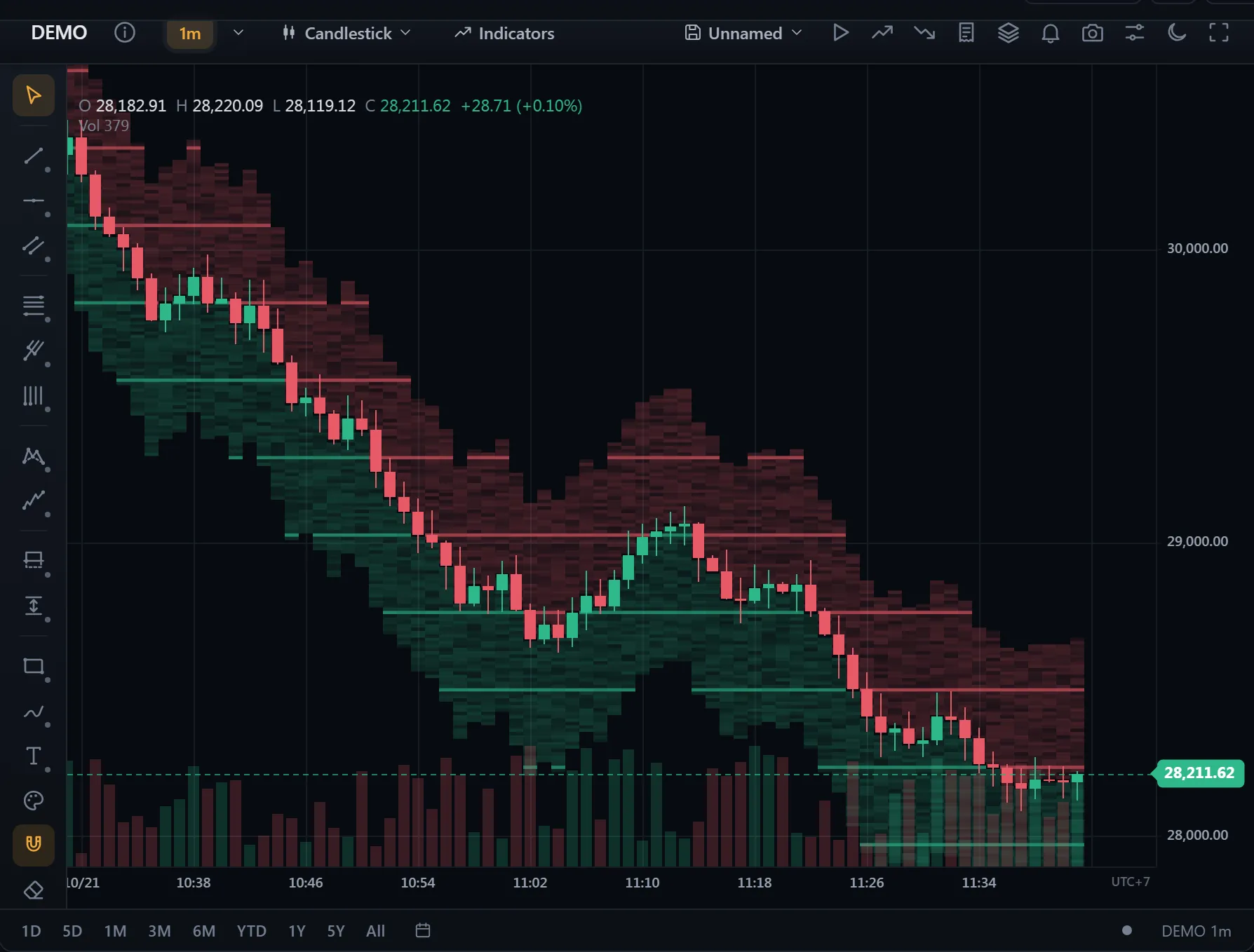 ● DemosLiquidity heatmapSimulated market data, generated in your browser
Frames: flat from 500 to 100,000 bars
- Two canvases — a scene canvas (grid, series, indicators, chart objects, axes) and a thin top canvas for the crosshair, legend and other pointer-tied visuals. A hover repaints only the top canvas (~0.2 ms), and the browser composites two surfaces, not four.
- Visible-range rendering — every renderer, the auto-scale and the indicator price range walk only the bars in view.
- No per-frame garbage — viewport snapshots are cached between changes; number and date formatters are reused instead of rebuilt per label.
- Auto-sized price axis — fitting the axis to its longest label costs ~0.05 ms and only relayouts when the width really changes.
Live ticks: incremental indicators
A tick only moves the forming bar, so an indicator with its own update() recomputes just that bar: ATR, Bollinger Bands, Chande Kroll Stop, DEMA, EMA, Envelope, KAMA, MACD, MA Cross, McGinley Dynamic, OBV, RSI, SMA, SMMA, Stochastic, Ulcer Index, Volume Oscillator, VWMA, WMA. Another 31 are built on PointwiseIndicator and resume from the last bar the same way, and an indicator that reads another indicator’s line resumes too. When the bars an indicator remembers no longer match, it recalculates in full. BB + EMA + RSI + MACD:
| History | Full recalculation | Incremental update() |
|---|---|---|
| 20,000 bars | ~5 ms | ~0.0005 ms |
| 100,000 bars | ~27 ms | ~0.001 ms |
Custom indicators can opt in too — see Plugins → fast live updates.
Switching symbol or timeframe
- Cheap full loads — indicator values live in an
IndicatorValueMap(array-backed, ~3× cheaper to build than a timestamp-keyedMap), andsetDatareuses already-valid bars instead of copying them. - Loading only when it is slow — the previous chart stays up; a veil appears only if a switch outlasts 200 ms, so a normal ~130 ms network switch never flashes.
- No stale data — superseded history requests are dropped and old sockets detached, so the last click always wins.
- Local resampling — static data switches timeframe without refetching; slow resamples paint the veil before the main thread gets busy.
LTTB downsampling
Line and area charts downsample the visible range to ~2 points per pixel with Largest-Triangle-Three-Buckets when there are far more bars than pixels — the line stays visually identical while drawing dozens of times fewer points. A no-op at normal zoom. The algorithm is exported for your own use:
import { lttbDownsample } from '@tradecanvas/chart'

// indices preserving the shape of a 100k series, reduced to 1600 points
const idx = lttbDownsample(series.length, 1600, (i) => series[i].close)| Visible points → 1600 | Time / frame | Throughput |
|---|---|---|
| 10,000 | ~0.025 ms | 39,600 / s |
| 100,000 | ~0.32 ms | 3,100 / s |
| 1,000,000 | ~2.6 ms | 380 / s |
Indicators zoomed out
Below a pixel per bar, indicator lines, bands and histograms draw one span per pixel column: the column's lowest to highest point, joined to the column before, as wide as the line. It looks much the same as a stroke through thousands of points for a fraction of the raster work. Zoomed out on 200,000 bars with Bollinger Bands, EMA, RSI and MACD, a frame went from about 54 ms to about 21 ms on integrated graphics. node scripts/bench-render.mjs runs these numbers on your own machine.
WebGL renderer (preview)
renderer: 'webgl' draws the plot and indicator panes with WebGL 2, on a canvas under the 2D scene: the grid, sessions, candles and volume directly, and the Canvas 2D drawing of indicators, compare lines and most chart types recorded as GPU strokes, fills and rectangles, antialiased at their edges as Canvas 2D is. The depth heatmap and the volume and market profiles are recorded the same way, under the bars; a market profile showing its stats readout or letters stays with Canvas 2D. Text, drawings, orders, axes and the crosshair stay on Canvas 2D, as does anything the GPU wouldn't draw the same (left to Canvas 2D in order, so the stacking doesn't change); custom indicator plugins come along without changes. Candles land on the same device pixels as with Canvas 2D; lines and fills differ only on a few antialiased edge pixels. The WebGL code is a chunk of its own (about 17 KB gzipped), loaded on first use; where WebGL 2 is missing, or its context is lost, the chart carries on with Canvas 2D. If the context comes back, WebGL does too. At most 8 charts on a page draw with WebGL at once (setMaxWebGLCharts), as Chrome and Safari keep only about 16 WebGL contexts a page and drop the oldest past that; a chart past the limit draws with Canvas 2D until one is let go. Checked in Chrome, Firefox and WebKit.
const chart = new Chart(el, { renderer: 'webgl' })

chart.on('rendererChange', (e) => console.log(e.payload))
// { renderer: 'webgl', reason?: 'contextRestored' }, or { renderer: 'canvas', reason: 'unsupported' | 'contextLost' | 'limit' }

await chart.setRenderer('canvas')   // resolves to what draws now

setMaxWebGLCharts(4)   // from '@tradecanvas/chart': at most 4 charts on the page draw with WebGL (8 by default)
Frame time while panning, on integrated graphics (Intel UHD; 16.7 ms is 60 fps):
| Chart | Pixel ratio | Canvas 2D | WebGL |
|---|---|---|---|
| 1600×900, 500 candles + 4 indicators | 2 | 27.4 ms | 19.6 ms |
| 1600×900, zoomed out on 200,000 bars + 4 indicators | 2 | 34.5 ms | 20.2 ms |
| 1600×900, zoomed out on 1,000,000 bars + 4 indicators | 2 | 34.5 ms | 16.7 ms |
| 1600×900, depth heatmap, 240 snapshots × 80 levels | 2 | 25.5 ms | 16.8 ms |
| Six charts, 500 candles and two indicators each | 2 | 23.5 ms | 17.2 ms |
| 2560×1400, 2,000 candles + 4 indicators | 1 | 41.6 ms | 17.7 ms |
| 2560×1400, 2,000 candles + 4 indicators | 1.5 | 70.8 ms | 17.6 ms |
| 2560×1400, 2,000 candles + 4 indicators | 2 | 114.5 ms | 29.1 ms |
| 2560×1400, 2,000 candles | 2 | 33.1 ms | 20.9 ms |
Most WebGL frames above land on 16.7 ms; the averages carry a few longer ones. At a pixel ratio of 2 on a 2560×1400 chart, the browser's compositing of the full-size layers alone takes about 23 ms on this GPU. node scripts/bench-render.mjs --renderer=webgl runs these numbers on your own machine.
A bar never gets narrower than a quarter of a CSS pixel, so “zoomed out on 1,000,000 bars” shows about four bars per pixel (about 6,400 bars on a 1600 px chart); the scene pans through the rest of the million.
The main thread
The chart computes indicators on the main thread. IndicatorWorkerHost from @tradecanvas/core can run calculate() in a worker you provide, with a Promise-based API, a per-request timeout and a synchronous fallback for SSR and tests, but the chart does not route its indicators through it yet, and the packages do not ship a worker script.