Finance charts
Charts for dashboards and reports, beside the candle chart. Each one is a class that takes an element and its options, sizes itself to the element and draws in the chart's dark or light theme; most follow the pointer with a tooltip.
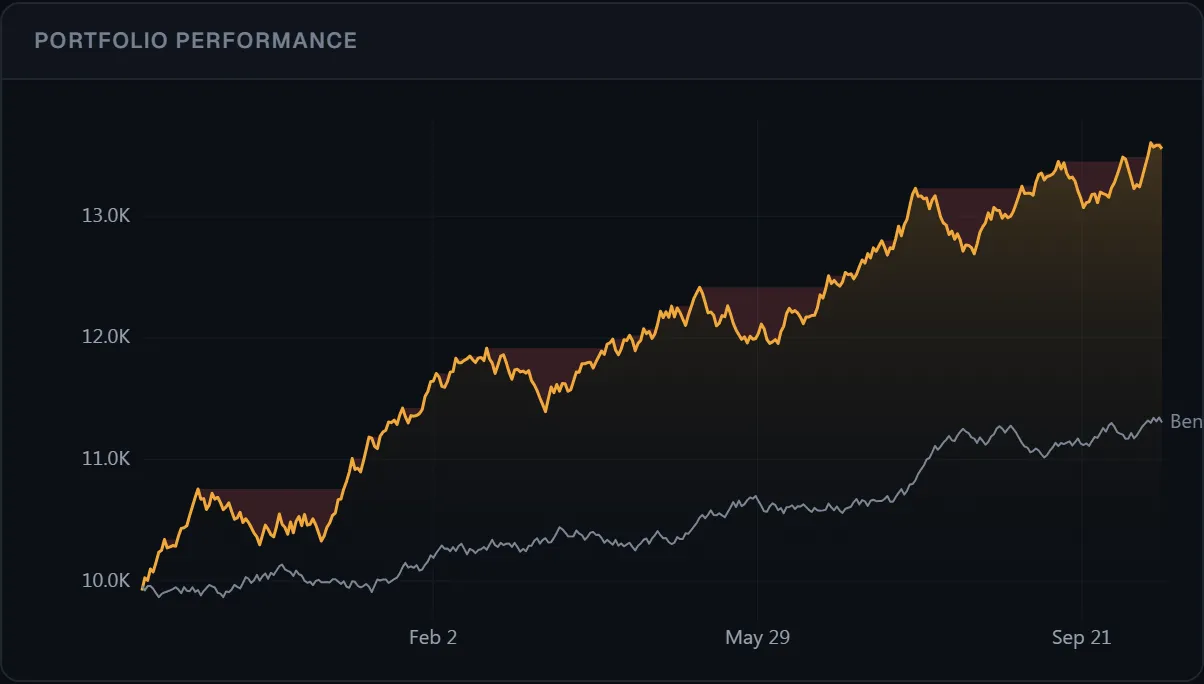 ● DemosEquity curve and drawdownSimulated market data, generated in your browser
The charts
| Class | For |
|---|---|
BarChart | Values by category: net flows, volume by session, returns by month. Grouped or stacked, upright or sideways, up and down from zero. |
DonutChart | Parts of a whole: allocation, exposure by sector. A pie with innerRadius: 0. |
ScatterChart | Two values per item: risk against return, valuation against growth; bubbles when a point has a size. |
HistogramChart | How values spread: daily returns, trade results, with lines at the mean or a VaR. |
CalendarChart | A value a day on a calendar: daily returns, P&L, a trading journal. |
MatrixChart | A value for each pair of rows and columns: correlations, volume by hour and weekday. |
CounterClockChart | Average price against average volume, bar by bar: the counter-clock cycle of a stock. |
SparklineChart | A small line in a watchlist row or a KPI tile. |
GaugeChart | One value against bands: sentiment, risk, margin use. |
HeatmapChart | Cells coloured by change, in a grid or a treemap sized by weight (market cap). With grouped, a sector map. |
WaterfallChart | Steps from a start to an end: P&L attribution, cash flows. |
DepthChart | Cumulative bids and asks of an order book. |
EquityCurveChart | An account's value over time, with drawdowns and a benchmark. |
PerformanceDashboard | A strategy report from a backtest: stats, equity, drawdown and monthly returns. |
What they share
const chart = new BarChart(element, { categories, series, theme: 'dark' })

chart.setOptions({ mode: 'stacked' })   // any option, merged
chart.setTheme('light')                 // 'dark' | 'light' | a Theme
chart.destroy()                         // removes the canvas and its listeners
Each chart fills its element and redraws when the element resizes. Where a chart has a hover
tooltip, crosshair: false turns it off. Bar, donut, scatter, histogram, calendar and matrix charts tell screen readers
what they show (the canvas has an image role and a label); ariaLabel puts it in
your words, for instance in your page's language. Numbers read with valueFormat (or xFormat / yFormat), else as
1,234.5 and, past ten thousand, 12.3K.
Bar chart
import { BarChart } from '@tradecanvas/chart'

// Foreign net buying over ten sessions: green above zero, red below.
const flows = new BarChart(el, {
  categories: ['6/10', '7/10', '8/10', '9/10'],
  series: [{ name: 'Net', values: [-660, 860, -280, 230] }],
  colorBySign: true,                    // or { positive, negative }
  valueFormat: (v) => v + ' bn',
  onBarClick: ({ category, series, value, index }) => openDay(index),
})

// Several series side by side, or stacked: positives up and negatives down from zero.
new BarChart(el, {
  categories: ['Foreign', 'Proprietary', 'Retail'],
  series: [{ name: 'Buy', values: [820, 310, 4200] }, { name: 'Sell', values: [-760, -280, -4290] }],
  mode: 'stacked',
  orientation: 'horizontal',            // bars to the right, labels on the left
  showValues: true,
})

flows.update(categories, series)
Zero is always on the value axis. Hovering a category shows every series' value for it;
the legend shows when there is more than one series (legend to choose). Labels
that don't fit along the bottom show every few categories.
Donut chart
import { DonutChart } from '@tradecanvas/chart'

new DonutChart(el, {
  data: [
    { label: 'Stocks', value: 52 },
    { label: 'Bonds', value: 23 },
    { label: 'Cash', value: 15 },
    { label: 'Gold', value: 10, color: '#d4a017' },
  ],
  innerRadius: 0.6,                     // 0 for a pie
  centerLabel: 'Total',
  centerValue: '1.2B ₫',
  onSliceClick: (slice) => filterBy(slice.label),
})
Slices go clockwise from twelve o'clock; values of 0 or less are left out. Each slice shows its share where it has room, and the legend lists names and shares, beside the ring when the chart is wide and under it when not.
Scatter and bubble chart
import { ScatterChart } from '@tradecanvas/chart'

new ScatterChart(el, {
  series: [{
    name: 'Banks',
    points: [
      { x: 21, y: 9, size: 480, label: 'VCB' },   // size: market value; the bubble's area follows it
      { x: 34, y: 24, size: 170, label: 'TCB' },
    ],
  }],
  xLabel: 'Volatility',
  yLabel: 'Return, a year',
  xFormat: (v) => v + '%',
  yFormat: (v) => v + '%',
  showLabels: true,
  onPointClick: (point, series) => openSymbol(point.label),
})
The axes leave room for the largest bubble (maxRadius, 24 px by default), and lines
mark x = 0 and y = 0 when the axes cross them (zeroLines: false to hide them).
Histogram
import { HistogramChart, histogramBins } from '@tradecanvas/chart'

new HistogramChart(el, {
  values: dailyReturns,                 // in percent
  binWidth: 0.5,                        // or bins: 20, or 'auto' (Sturges' rule)
  colorBySign: true,
  valueFormat: (v) => v.toFixed(1) + '%',
  markers: [{ value: mean, label: 'Mean' }, { value: var95, label: 'VaR 95%', color: '#e85a67' }],
})

histogramBins([1, 2, 2, 3, 10], { bins: 3 })
// [{ from: 1, to: 4, count: 4 }, { from: 4, to: 7, count: 0 }, { from: 7, to: 10, count: 1 }]
Calendar
import { CalendarChart } from '@tradecanvas/chart'

// A year of sessions, Monday to Friday, coloured by the day's change.
new CalendarChart(el, {
  data: [{ date: '2025-01-02', value: 1.2 }, { date: '2025-01-03', value: -0.8 }],   // YYYY-MM-DD
  weekdays: 5,                          // 7 (default) every day; weekStart: 0 starts weeks on Sunday
  locale: 'vi-VN',                      // month and day names
  colorScale: { min: -2, max: 2 },      // the theme's red and green, full at ±2
  valueFormat: (v) => v.toFixed(2) + '%',
  onDayClick: (day) => openSession(day.date),
})
Weeks run left to right and weekdays top to bottom, one band a calendar year and ten years at most; when the chart is too short for all of them, the oldest give way. Days without a value are drawn empty, and the colour bar underneath shows the scale (legend: false hides it).
Correlation matrix
import { MatrixChart, correlationMatrix } from '@tradecanvas/chart'

// Daily returns, not prices: one array per stock, the same days in each.
const names = ['VCB', 'BID', 'CTG', 'TCB']
const values = correlationMatrix(returnsByStock)

new MatrixChart(el, {
  rows: names,                          // columns: [...] for a matrix that isn't square
  values,                               // values[row][column]
  triangle: 'lower',                    // half is enough for correlations
  colorScale: { min: -1, max: 1 },
  onCellClick: ({ row, column, value }) => compare(row, column),
})
Cells stay square and print their value where it fits (two decimals unless valueFormat); column names that don't fit across their cells are turned. correlationMatrix pairs the days both series have and gives NaN for fewer than three, which leaves the cell empty. A matrix suits other tables of values too, such as volume by hour and weekday.
Sector map
import { HeatmapChart } from '@tradecanvas/chart'

new HeatmapChart(el, {
  data: [
    { id: 'vcb', label: 'VCB', value: 0.8, weight: 480, group: 'Banks' },
    { id: 'hpg', label: 'HPG', value: 1.9, weight: 160, group: 'Steel' },
    { id: 'vhm', label: 'VHM', value: -2.4, weight: 170, group: 'Real estate' },
  ],
  grouped: true,                        // tiles by group, then by stock
  valueFormat: (v) => v.toFixed(1) + '%',
})
Each group takes the room of its stocks' weights, and its name and weighted change head its tile where they fit. The heatmap's colours run from -5 to 5 unless colorScale gives a min and max.
Counter-clock chart
import { CounterClockChart } from '@tradecanvas/chart'

const clock = new CounterClockChart(el, {
  data: bars,                           // OHLCV bars, oldest first
  period: 25,                           // bars in each average
  points: 120,                          // the newest points drawn
  xLabel: 'Volume, average', yLabel: 'Price, average',
  onPointClick: (p) => goTo(p.time),
})

clock.getPhase()                        // 1–8: the direction of the last move
Each point is the 25-bar average of volume (across) and of the close (up), joined in time order and fading with age. A healthy cycle turns counter-clockwise. getPhase() (and counterClockPhase(points)) name the last move: 1 volume rising, 2 both rising, 3 price rising, 4 price rising on falling volume, 5 volume falling, 6 both falling, 7 price falling, 8 price falling on rising volume.
Sparkline, gauge, heatmap, waterfall, depth and equity curve
import { SparklineChart, GaugeChart, HeatmapChart, WaterfallChart, DepthChart, EquityCurveChart } from '@tradecanvas/chart'

new SparklineChart(el, { data: closes, mode: 'area', showLastPoint: true })

const gauge = new GaugeChart(el, {
  value: 72, min: 0, max: 100, label: 'Fear & Greed',
  zones: [{ from: 0, to: 45, color: '#e8505b' }, { from: 45, to: 55, color: '#8a93a3' }, { from: 55, to: 100, color: '#1fa874' }],
})
gauge.setValue(64)

// A treemap sized by market value, coloured by the day's change.
new HeatmapChart(el, {
  data: [{ id: 'vcb', label: 'VCB', value: 1.2, weight: 480 }, { id: 'fpt', label: 'FPT', value: -0.8, weight: 170 }],
  weighted: true, showLabels: true, showValues: true,
  onCellClick: (cell) => openSymbol(cell.label),
})

new WaterfallChart(el, { data: [{ label: 'Start', value: 10000, type: 'total' }, { label: 'Fees', value: -85 }, { label: 'End', value: 9915, type: 'total' }] })
new DepthChart(el, { data: { bids, asks }, midPriceLine: true, spreadLabel: true })
new EquityCurveChart(el, { data: equity, benchmark, drawdown: true })
Performance dashboard
PerformanceDashboard puts a strategy report together from a backtest: a strip of
headline stats, the equity curve, the drawdown under it and a calendar of monthly returns.
Pair it with the analytics backtester.
import { Backtester } from '@tradecanvas/analytics'
import { PerformanceDashboard } from '@tradecanvas/chart'

const result = new Backtester({ initialCash: 10_000 }).run(bars, myStrategy)

const dash = new PerformanceDashboard(document.getElementById('report')!, {
  result,            // any { equityCurve, metrics }: Backtester output fits
  theme: 'dark',
  title: 'SMA Crossover',
  subtitle: 'BTC/USDT · 1h · 2023',
})

// later: dash.update(newResult) · dash.setTheme('light') · dash.destroy()
The calculations are exported for a layout of your own: computeMonthlyReturns, computeDrawdownCurve, toEquityPoints, selectKeyStats, and
for axes of your own niceScale(min, max) (ticks in steps of 1, 2, 2.5 or 5).